• Win a Free Custom Engraved Brass Coin!!!
    As a way to introduce our brass coins to the community, we will raffle off a free coin during the month of August. Follow link ABOVE for instructions for entering.
  • PRE-ORDER SHIPS IN SCALE TODAY!

    The beloved Ships in Scale Magazine is back and charting a new course for 2026!
    Discover new skills, new techniques, and new inspirations in every issue.

    NOTE THAT OUR FIRST ISSUE WILL BE JAN/FEB 2026

Lifting Cant Frames

Joined
Jul 12, 2023
Messages
105
Points
78

Hi, can anyone guide me to a diagram of how to lift cant frames from ships plans? I have a plan of their location and number but need to understand the projection from this view to manufacture the correct shape and size to adjust to fit my model.

Thanks in advance…… a book reference will surfice as this point is often skipped over in references or are already provided in kit plans.
 
In short, if one is intent on lofting canted frames instead of simply fitting them to the hull itself, each canted frame must be generated by orthographically projecting the absent depiction of its actual shape in two dimensions. This is essentially the same mechanical drawing process that is used to project the actual two dimensional shape of a flat raked transom in the standard views of vessel plans. The raked transom as depicted in the body plan is shown as it appears in two dimensions at an angle. Therefore, it is actually larger in its vertical dimension that is shown in by its shape in the body plan which it "tilted." If you want to cut out a pattern of the transom and the fashion piece frame shapes, their actual size and shape must be developed on the drafting board. Only in rare instances is this development provided for you by standard lines drawings. Below is a YouTube video link explaining the mechanical drawing process as it is applied to loft a raked transom shape. The process as applied to canted frames basically treats the overall shape of the canted frame in the same manner as the raked transom, except that the canted frame is "canted" on the horizontal axis and the transom is "raked" on the vertical axis. See:

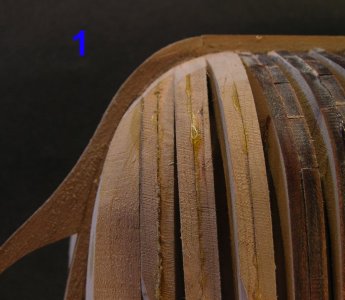
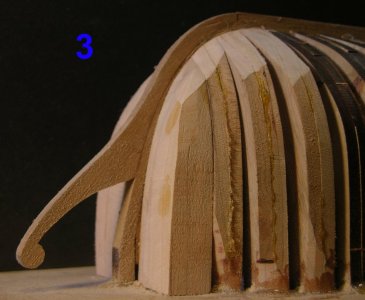
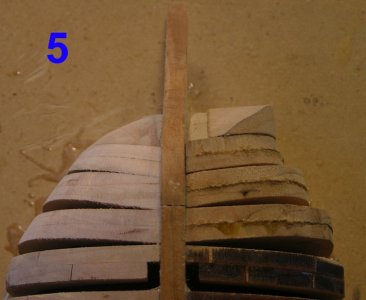
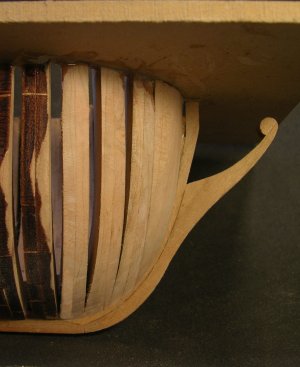
Canted frames are placed in the same fashion as any other frame, but their placement is generally irregular, deviating from the regular "room and space" of the frames set perpendicular to the centerline of the hull. There is a wide variation in both the historical record and the actual practice of the spacing and placement of canted frames depending upon the type of vessel and the period in which it was built as well as the vagaries of chance at the time of construction. There does not appear to be any hard and fast rules. Indeed, there were likely variations based simply upon the master shipwright's judgment of the moment, often dictated by the availability of the suitable timber on hand in the yard.

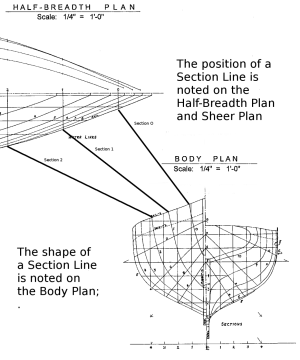
You are fortunate in having a plan indicating the "location and number" of canted frames, but you don't specify what reference point is used for that spacing on the plans. It will make a difference whether the spacing indicated is the spacing along the deck sheer line or their spacing is along the widest waterline. (Neither do you mention the source of your plans, so we have no way to know whether they are historically accurate or simply a figment of some much later draftsman's guess, however educated.) If you wish to loft the shapes of the canted frames from your plans, they will have to be generated by projecting them from the information given on the lines drawings. This will require a lot of interpolation of the given section lines and require projection of each individual canted frame. Unless one is trying to depict the actual "as built" construction details in an unplanked model, on a scale model the canted frames are usually much more conveniently dispensed with entirely and replaced with some alternate structure to define the bow shape and hang plank on. There are a number of approaches to scale modeling a prototype which was dependent upon canted frames to define the shape of hull ends.

If the modeler is intent upon depicting some unplanked "open frame" structure, it is extremely unlikely that information sufficient to sustain any claim to historical accuracy will be available for any particular period vessel. This is not a concern where one is merely replicating a contemporary model, making "a model of a model," as it were, but we know for certain that in most all instances the exposed framing structure of most all contemporary models which might be replicated today was stylized and provides little, if any, guarantee of accurately depicting the actual construction details of the prototype, if in fact the prototype was ever built at all. That said, if the modeler is intent upon depicting a credible guess as to the applicable period bow construction details, those details cannot be "lifted from the plans," but rather must be generated from the plans by projecting the shapes using standard mechanical drawing techniques. Instructions for manually generating frame shapes projected in two dimensions can be found in books on lofting and mechanical drawing. The best one I know that is presently in print is Alan Vaitses' Lofting. (https://www.amazon.com/Lofting-Allan-H-Vaitses/dp/0937822558) If you are using CAD, you will have to refer to your particular program's instructions.

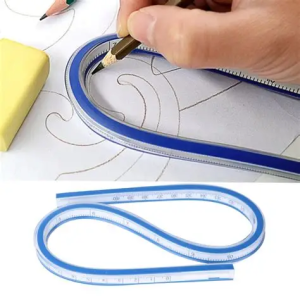
The shapes of the various canted frames can also be "taken up" from the hull itself using a "flexible curve." A flexible curve is a drafting instrument which is essentially a batten that will stay where it is bent in order to transfer irregular curves from a drawing. Flexible curves can be found in stationery, sewing, and craft and art supply stores, or online. (See: https://www.amazon.com/STAEDTLER-24...phy=88716&hvtargid=pla-4584138877889845&psc=1) The consist of a flexible vinyl extrusion containing a malleable metal rod inside which is bent to the shape desired and will hold that shape so that the curve may be used in the customary way to draw the curve depicted by the shape the flexible curve was bent into. For the purposes of taking up frame curves, etc., on ship models, a commercially made flexible curve may be too large and unwieldy. In such case, the modeler can easily make a smaller ono themself by taking a strip of malleable metal, such as annealed copper or zinc flashing sheet, and laminating it with a "springy" sheet material such as thin plastic to give the "sandwich" a bit of "spring" to form a fair curve when bent, but not so much "spring" that the malleable metal cannot hold the curve in place once it is bent.

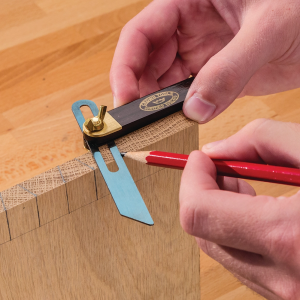
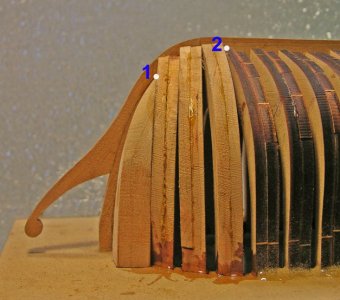
In use, a framework of temporary battens are sprung over the bow section, using temporary bulkheads at the sections as provided in the plans, if necessary, to define the inside shape of the area to be defined and supported by the canted frames (as in bent frame construction) and the flexible curve, be it store bought or homemade, is bent to a fair curve at the location of a canted frame inside the "basket" formed by the temporary battens. That curved shape formed on the edge of the flexible curve is then used to draw the shape taken from the actual structure which should be a copy of the shape of the canted frame face at the position and angle of the canted frame to be constructed. Final fitting to the model structure itself is done by hand shaping as required. In some instances, it may be helpful to use the flexible curve to take a "rough" fitting to be transferred to card stock that can be easily trimmed with scissors to make a pattern more closely fitted to the shape required and then the fitted card stock pattern used to get out the wooden frame. The angles of the bevels on the foot of the canted frames are taken up using a standard design "mini" bevel gauge which the modeler will have to make out of suitable metal (brass sheet stock or a piece of a broken hacksaw blade, etc.) or plastic (an old credit card, etc.) and a copper tack rivet. For open frame construction, this is probably the easiest and least time-consuming way to go. It's what real-life shipwrights call "building to the ship," rather than "building to the plans." The timbers are sawn "outside the line" and the carpenters fit them to their partners as the ship is actually built.

Store-bought Staedler flexible curve:
1763590706054.png

Store-bought "mini" bevel gauge. Cute, but not small enough for modeling. Half that size, at most, for modeling. No need to make the blade "sliding" unless you want to get really fancy. No need for a "tightening" joint. Just a copper tack headed as a rivet to join the two arms with a friction fit is sufficient. Adjust the tightness of the arms with a tap of your rivet hammer on the head of the copper tack rivet as needed.
1763594868631.png

On the other hand, if "as built" framing is not going to be depicted, the hull shape in the area of the canted frames can alternately be shaped from a block or blocks of solid wood in the same manner as the carving of a solid hull shape using the perpendicular section lines as drawn and a fairing batten to sand the shape fair. (Remembering to deduct for the plank thickness as may be required, so the planking over the solid blocks will be fair with the planking over the perpendicular frames. This is the fastest and easiest way to go.

The current popularity of "open frame' "as built" model construction does in some instances produce an attractive model, if for no other reason than that in period ships of the line leaving the hull unplanked below the waterline creates a model that many find more aesthetically pleasing by "lightening" the large mass of hull below the waterline which some believe detracts from the appreciation of the deck and top hamper. Nevertheless, modelers shouldn't feel compelled to limit themselves to planked hollow hulls in period vessels for any reason other than a matter of style, since we have little, if any, reliable historical information on exactly how any particular vessel was actually framed as of her launching and/or any subsequent refits or modifications.

1763585983623.png
 
Last edited:
I am taking a slightly different tack.
I build POF - stylized - no planking below the main wale.
I also hate cant frames. I will not use them. There is not all that much frame timber below the wale in the zone where cant frames live anyway. I use full frames just as far as the Body plan has stations.
Many of the stylized 17thC, Navy Board models did the same thing.
The pre-1776 Georgians were either crude block models or POF with full frames from hawse to transoms.
I tried to be thorough in my sweeps of the RMG website and I find only three exceptions in my era of interest (1719-1776) Intrepid 64 1770, Bellona 74 1760, Victory 100 1765.
These three are framing only and they do have cant frames. - If they were not Well they should have been engineering classroom demonstration models for the young gentlemen. The last two vessels are so over done as subjects for models that I have no interest what so ever in building a model of either of them.
There is one serious chore that comes from doing full frames all the way - the bevel is extreme. Way more wood is taken off than remains. It is worse at the bow.

This extreme bevel is why cant frames were used. Even if timber stock with the large dimensions necessary could be had, the racked rectangle cross section of what was left may not have had the required strength. For a model, having the necessary framing stock size is no problem.

The problem that faced cant design is a wide outside arc that is essentially 90 degrees and a limited space for the heels on the deadwood. The heel of a cant frame were almost always in contact with the heel of the frame on either side. This tends to limit how much outside arc can have frame support.

If T was forced to model cant frames here is how I would do it:
I use a raster drawing program.
Each cant frame is a unique unit.
WL plan XZ
If your WL plan is not only the actual lines. If the background is not transparent. Use the magic wand selector and do whatever it takes to CUT everything but the actual lines.
If the lines are too faint - use the bucket fill and darken the lines with 000-000-000 and or background/contrast at -100 -100 - whatever it takes and how many clicks of the bucket are needed to get the lines dark enough.
Choose a cant frame
Place a baseline at the heel of the forward face where it intersects with the baseline (center of keel) of the WL plan. This line is to be perpendicular to the plane of the face.
Use rectangular SELECT to COPY the frame face line and include all of the WL and the rail - everything on the WL plan- PASTE to new layer. = Layer 1
If the cant is a bend, do the same for the midline. Layer 2
Do the same for the deadflat face Layer 3

Duplicate Layer 1.
Always use duplicates!
Experiment with Rotate degree values until you find the value that has the face line be perpendicular to the WL centerline. and your drawn frame baseline exactly overlays the WL centerline. If both do not happen go back and place a new frame baseline that does. Write the value down on your data card. This is also the value for layer 2 and layer 3

The BODY plan XY has a vertical centerline - a horizontal baseline - a horizontal line for every WL - the rail is ambiguous/unclear - a vertical line for every Buttock line. The station line patterns are not needed - get in the way - confuse and obstruct. Only the grid is wanted.
Rotate Layer 1 90 degrees ( a copy of layer 1) The face of the frame should be horizontal and the base should overlay the vertical centerline.
Make as many copies of Layer 1 as there are data points on the WL plan.
On copy 1 CUT everything but rabbet at keel data point - place the layer at that horizontal level
On copy 2 CUT everything but WL 1 data point set it at WL1 level
Repeat for every WL

Go to the Profile/Sheer plan. YZ
There are no frame lines except the stations.
What is needed is the vertical distance from the baseline to the cant frame face line for each Buttock line and any other lines like wales and rail. The cant is oblique on this plan.

OK - what is needed is the combined WL and Profile plan.
The WL plan defines where a cant frame line crosses each wale and rail.
Place a loooong vertical line at the intersection of the rail and the cant line.
Go up to the Profile plan COPY the vertical line from profile baseline to the rail SAVE to its own layer
COPY the lower part of this vertical line from the WL baseline to the rail point - This how far out it is. Save to its own layer.
Rotate it 90 degrees. Open both layers. Move the how horizontal how far out it is line until it is at the baseline of the how far up it is line.
COLLAPSE to a single layer. This new layer now has how far up and how far out for the rail.
Do this for every wale and rail.

Go back to the BODY plan
Place the rail data point at it proper X distance. CUT the parts that get in the way.
Repeat for every Profile data point that is each Buttock line and every wale and rail.

When done there should be a series of points that define the outside shape for the forward face of the cant frame.
Now comes the fun part! Connect the points with the proper curve that belongs in the series.

My drawing program has a freehand continuous curve following the cursor function - I cannot use this - too shaky and unsure.
A connect the dots function. Click at a spot - move the cursor click a new spot and a straight line connects the two. I use this. It is facets - not a smooth curve. If the dots are close it looks like a curve. Sand or carve or plane the wood using it and it is a curve. It is impossible to make it facets.
For full frames, the curves of the previous frame - or in my case station - provide a good guide to get the needed transition.

OK doing this is tedious, repetitive, time consuming, and boring. Would not sticking with only do as full frames be the more sane option?

 
Last edited:
Thanks Allan,

I've been searching high and low for a book or article like this. It looks very promising, and I look forward to learning from it.

At present I am using my own technique that I have cobbled together using my old Autodesk software from 2013 and the CAD tools I am familiar with. This pdf should help me obtain a greater understanding of the correct processes and improve my current method and precision.

Many thanks,

Richard
 
At present I am using my own technique that I have cobbled together using my old Autodesk software from 2013 and the CAD tools I am familiar with. This pdf should help me obtain a greater understanding of the correct processes and improve my current method and precision.
No matter the software I bet you will do a great job of it. Please share any insights that you come across when you find ones that you think could be helpful.
Allan
 
For those of you who do not CAD and who might have studied Mechanical Drawing or better yet Descriptive Geometry lofting a transom and can’t frames involves what used to be called “making a true view”. This same technique is involved in correctly laying out the head rails on sailing vessels. An old text book will explain how to do this.

Roger
 
Thank you to all that replied, I am amazed at you genenerosity of time and expertise. Interestingly I have completed the projection of the transom frames and size/shape etc. I therefore assume the issue may be getting my mind around the Cant frames.

What is also of interest is the range of solutions and the applied technologies. For example “leave them off”, “make bigger ones and cut/sand back to shape” through traditional drafting and geometry to full blown CAD!

I am still preparing the mid-ships square frames and getting them in place, so still some time to read again your suggestions and move forward with a solution.

By the way the 1829 proposals and the 1835 drawings of my vessel are on my build log in the plank on frame wood from original plans. The vessel is HMP Seagull.

Thanks again to you all…….
 
Look further up this page Bob. Allan has sent it as an attachment.
Got it! Thanks. Discovered that as I read down through the posts. I guess I should read all the posts before I write anything, instead of replying in order starting with the first one I haven't read! :)
 
Back
Top