• Win a Free Custom Engraved Brass Coin!!!
    As a way to introduce our brass coins to the community, we will raffle off a free coin during the month of August. Follow link ABOVE for instructions for entering.

CAD for those who do not have funds for commercial software

For reference: another option is FreeCAD, a 3D parametric modeler. I barely understand how to use it though. Those are quite complex softwares. I would love to see specific tutorial relate to ship modeling.

 
For reference: another option is FreeCAD, a 3D parametric modeler. I barely understand how to use it though. Those are quite complex softwares. I would love to see specific tutorial relate to ship modeling.


a lot of the CAD software is complex, however you do not actually need all the tools and functions.

what are you lwanting to learn from a tutorial on using CAD to draw ship plans?

drawing a plank on frame or plank on bulkhead?

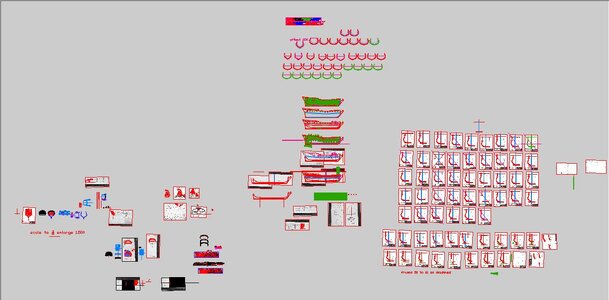
this is a working master drawing in Auto Cad. The white squares are scans of the original drawings that are being traced.

screen shot1.JPG

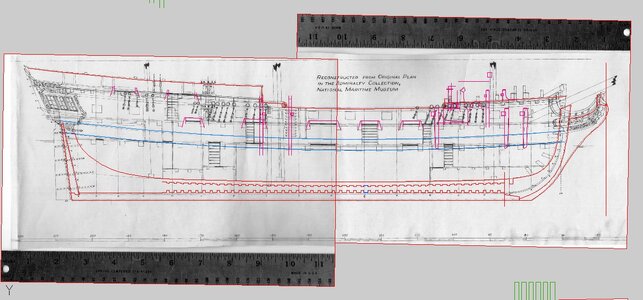
like this

screen shot2.JPG

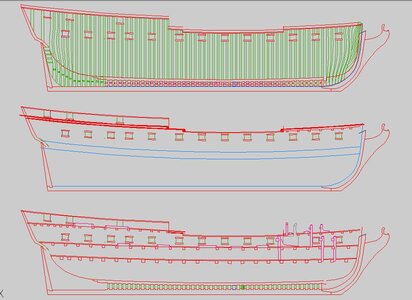
from the original plan i create 3 views an inside profile an outside profile and a framing plan. As i develope the drawing more and more details are added.

screen shot3.JPG
 
FreeCAD has greatly improved in the 1.0 and more recent releases. When Fusion360 started playing silly games with licensing I bought Alibre Atom as I wanted parametric cad / 3D modeling and the maker version of Solidworks was in it's infancy and lacking too many features . Over the last few years, the Maker version of Solidworks has gotten MUCH better and now has CAM included. It does have some restrictions if you need to co-exist with other CAD programs, just a heads up. You'll be doing the IGES and STEP shuffle, or maybe using OBJ or STL files to play nicely with others. Flip side is that right now the annual subscription is half the cost of annual maintenance on Alibre. FreeCAD still has some quirks, constraints are sometimes oddly behaved. For $24 USD on a special this month going with Solidworks for Makers would be my recommendation. It's not free, but it's pretty darn low cost. The install on your local machine is subscription based BUT it does allow running without an internet connection for up to 30 days once all is set up. If you don't have internet in a shop building you can still take your laptop out to the shop and get things done.

I saw some mention of 2D CAD programs, and LibreCAD is very good, very free, and very open source. Makes a linux bigot like me happy. BUT it's 2D. It's not parametric. If you are going to learn CAD today, particularly if any kind of 3D designs are in the cards, going 2D doesn't make sense. It rules out 3D printing, resin printing, true 3D organic shape routing or milling, and sending files to a service company should you want or need to outsource some aspect of a build.
 
I’m so tempted to dip a toe in the Solidworks pond at this price, if only to loosen my ties to F360. But another big learning curve is unappealing. Which is also a timely point to repeat this;

Whatever 3D CAD software you choose, you are going to have to invest a significant amount of time in learning and you may find yourself reluctant to change horses down the line. Of course it gets easier and easier as you go along, but those first few months can be testing. While you can share dxf drawings and stl’s across programmes, I don’t think you can share projects I.e. I could not simply open my F360 work in SolidWorks and continue from there. This is not like MS Word or Photoshop.

My tuppence worth is to try everything out that you can lay hands on for free and see what feels best for you. As far as I can tell, all of the major programmes are good but each has its own strengths and weaknesses, so it is not a case that this or that programme is head and shoulders better than the others. And incidentally, F360 is still free for hobbyists, but expensive if you want to buy a licence.
 
I'm going to throw my hat in for Solidworks, I have used it professionally for over 20 years. Aside from programs like CATIA or Siemen's NX that have class A surface modelers, Solidworks is going to be one of the best at creating smooth surfaces like a ship's hull.
 
can files be shared between the different cadd pgms? is there a universal format?
.DWG and .DXF are the usual native file formats. I am not sure what the differences maintain, but I know a lot of .DXF files are used for importing into or developing a machine program for machine tools like CNC or CADCAM. .DWG is surely just a 2 or 3 dimension drawing file that is universally accepted across all CAD software.
 
Interesting to see the different free options people use. LibreCAD api is great for simple 2D work, and FreeCAD definitely has a steeper learning curve, but it’s powerful once you get the basics down. For hobby projects or model building, these lightweight tools are often more than enough without needing expensive commercial software.
 
Last edited:
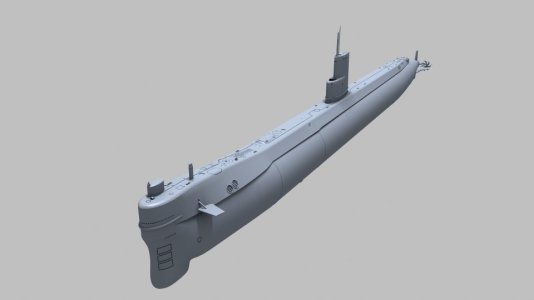
Here's an example of getting what you pay for (-once you learn how to use it): Lightwave3D software sells for $495 and has no expiration date -unlike most paid apps where you "rent" them on a yearly basis and basically "hook" you once you become proficient. Updates are $195 a year, and I take advantage of them every couple of years if the upgrades justify the time I save. LW can export its native format as OBJs and the 3D slicer imports the OBJ files as STLs for printing.

Lightwave has the ability to create photo-realistic renders for advertising and other purposes. Its animation capability has been used for countless movies and TV shows as well and contains a multitude of VFX capabilities in one app. The UI beats any modeling software I've ever used (or experimented with) for its ease of use and a shorter learning curve - especially compared to free apps I've used like Blender, (whose UI is a mess) and Fusion which is a PITA to deal with as far as its hierarchy format and constraints; organic models are very difficult to produce. I've trained over a dozen people from scratch, and they were modeling simple objects on their own in five days. Those who continued were very proficient after a couple of months. It's actually very enjoyable to use! I would pay for it just to use its modeling program alone.

While not everyone needs or can afford a paid program, it's nice to have so much capability in an easy-to-use, single app that never needs a renewal fee. The old adage, "You get what you pay for." certainly applies. A free, 30-day trial version is available.

Just my .02. Your milage may vary.

CC

Frame 0.jpg

In-Situ 02.jpg

IMG_3332.JPG
 
Last edited:
FreeCAD has greatly improved in the 1.0 and more recent releases. When Fusion360 started playing silly games with licensing I bought Alibre Atom as I wanted parametric cad / 3D modeling and the maker version of Solidworks was in it's infancy and lacking too many features . Over the last few years, the Maker version of Solidworks has gotten MUCH better and now has CAM included. It does have some restrictions if you need to co-exist with other CAD programs, just a heads up. You'll be doing the IGES and STEP shuffle, or maybe using OBJ or STL files to play nicely with others. Flip side is that right now the annual subscription is half the cost of annual maintenance on Alibre. FreeCAD still has some quirks, constraints are sometimes oddly behaved. For $24 USD on a special this month going with Solidworks for Makers would be my recommendation. It's not free, but it's pretty darn low cost. The install on your local machine is subscription based BUT it does allow running without an internet connection for up to 30 days once all is set up. If you don't have internet in a shop building you can still take your laptop out to the shop and get things done.

I saw some mention of 2D CAD programs, and LibreCAD is very good, very free, and very open source. Makes a linux bigot like me happy. BUT it's 2D. It's not parametric. If you are going to learn CAD today, particularly if any kind of 3D designs are in the cards, going 2D doesn't make sense. It rules out 3D printing, resin printing, true 3D For more details organic shape routing or milling, and sending files to a service company should you want or need to outsource some aspect of a build.
For individuals who need powerful CAD capabilities but lack the budget for commercial software, several excellent free and open-source options provide a strong foundation for design work. Tools like FreeCAD, LibreCAD, and Blender offer advanced modelling features suitable for engineering, architecture, product design, and 3D printing, without the high cost associated with professional suites.
 
Back
Top