
• Win a Free Custom Engraved Brass Coin!!!
    As a way to introduce our brass coins to the community, we will raffle off a free coin during the month of August. Follow link ABOVE for instructions for entering.
  • SUBSCRIBE TO SHIPS IN SCALE TODAY!

    The beloved Ships in Scale Magazine is back and charting a new course for 2026!
    Discover new skills, new techniques, and new inspirations in every issue.

    NOTE THAT OUR NEXT ISSUE WILL BE MARCH/APRIL 2026

False lasser error-software limit

Joined
Jan 21, 2022
Messages
912
Points
403

Hi

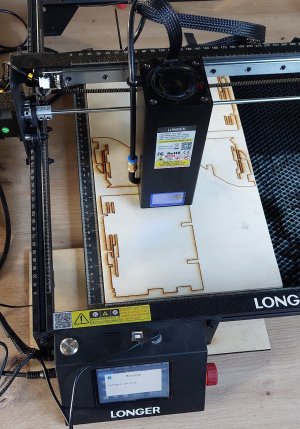
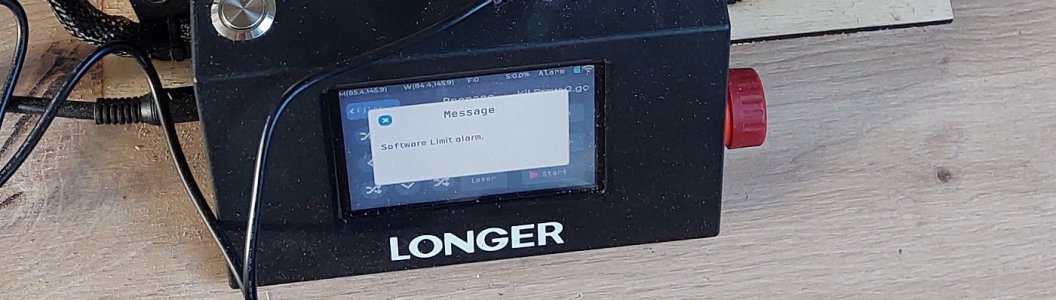
I just recently bought Longer Ray5 40W to speed up cutting plywood. I had no problem with smaller parts, but on log ones it keeps this false error.
I don't know what to do with it- it's on a second layer of cutting and "Software limit alarm" appears in the middle of a work area.
Do you know how to fix it without connecting laser to computer and disabling soft limit?
20260313_160455.jpg
20260313_1604555.jpg
 
i agree with Kevin try a laser cutting forum

i use an industrial size laser and even these big machines have a limit to the amount of information it can process *size of the cutting file" it will just stop
As you said you have no problem with small parts it is the bigger parts that are a problem. There may not be a fix to this it is just the limits of the machine
 
All I'd add to Dave's is that your Longer Ray5 40W looks fairly similar to my Elegoo Phecda 20W and I've cut far more busy and complex patterns than what you're showing.
 
.​

The reason may be that Kevin’s curves are better defined, that is, in a more optimised way. For example, of two identical curves, one might be defined by just a few points, whilst the other, quite unnecessarily, by ‘millions’ of points. And it is precisely the coordinate data for these completely unnecessary ‘millions’ of points that can quickly fill up the device’s memory. If someone has little experience in digital design, they can easily fall into this trap.

In any case, I would first look into this particular possibility.

.​
 
I don’t know the answer but have you tried asking on the Lightburn forum? That has a much larger pool of laser users.
I haven't found exacly the same issue on light burn forum. Solution to similar problems might be truning off soft limit, but it reqires pluging machine to computer which is little problematic at the moment as machine is in garage and I don't have any free laptop at my hand

All I'd add to Dave's is that your Longer Ray5 40W looks fairly similar to my Elegoo Phecda 20W and I've cut far more busy and complex patterns than what you're showing.
I've cut very same files on 10W version with no issues besides not cutting deep enough
 
The reason may be that Kevin’s curves are better defined, that is, in a more optimised way. For example, of two identical curves, one might be defined by just a few points, whilst the other, quite unnecessarily, by ‘millions’ of points. And it is precisely the coordinate data for these completely unnecessary ‘millions’ of points that can quickly fill up the device’s memory. If someone has little experience in digital design, they can easily fall into this trap.

In any case, I would first look into this particular possibility.
This might be te possibility, but I've cut very same file on less powerfull version of this laser with no such errors

BTW What is the program you use to your reconstructions?
ViewCapture20260129_095812.jpg
 
You might be right Waldemar but I'd be surprised if that was the case as I've seen people engraving photos onto material with the same kind of diode lasers as ours, which are way more demanding on the software.

WojtasS, you've said you can't use a PC/Laptop at present, so I assume you're using some kind of memory stick/card/pen drive. A thought that just popped into my head is that my 3D printers are very fussy about memory sticks. Some don't like sticks that have huge capacity, some just don't like certain sticks for no apparent reason, and I have had prints fail, just stopping mid-print, due to the memory stick. It might be worth trying a few different sticks just in case.

 
i agree with Kevin try a laser cutting forum

i use an industrial size laser and even these big machines have a limit to the amount of information it can process *size of the cutting file" it will just stop
As you said you have no problem with small parts it is the bigger parts that are a problem. There may not be a fix to this it is just the limits of the machine
Thanks for the tip. The file is certainly smaller than the work area, so it must be sth else
 
You might be right Waldemar but I'd be surprised if that was the case as I've seen people engraving photos onto material with the same kind of diode lasers as ours, which are way more demanding on the software.

WojtasS, you've said you can't use a PC/Laptop at present, so I assume you're using some kind of memory stick/card/pen drive. A thought that just popped into my head is that my 3D printers are very fussy about memory sticks. Some don't like sticks that have huge capacity, some just don't like certain sticks for no apparent reason, and I have had prints fail, just stopping mid-print, due to the memory stick. It might be worth trying a few different sticks just in case.

Thanks, haven't thought about that. The 10W version didn't have such problems, so I assumed pendrive is OK
 
.​
BTW What is the program you use to your reconstructions?

In my particular case, it is Rhinoceros. I am deliberately not emphasising this point, as it is just one of a whole family of 3D CAD software suitable for this type of work. Nor do I want the brand name of any specific computer software to overshadow the substance of the issues I am presenting, as is frequently the case in other presentations.

.​
 
Back
Top