
-

SUBSCRIBE TO SHIPS IN SCALE TODAY!
The beloved Ships in Scale Magazine is back and charting a new course for 2026!
Discover new skills, new techniques, and new inspirations in every issue.
NOTE THAT OUR NEXT ISSUE WILL BE July/August 2026 -

Win a Free Custom Engraved Brass Coin!!!
As a way to introduce our brass coins to the community, we will raffle off a free coin during the month of August. Follow link ABOVE for instructions for entering.


You are using an out of date browser. It may not display this or other websites correctly.
You should upgrade or use an alternative browser.
You should upgrade or use an alternative browser.


- Joined
- Oct 9, 2020
- Messages
- 2,673
- Points
- 538

wow, this tool is great!


Thanks Mint and welcome to the forums and greetings from Texas! Magic Mike


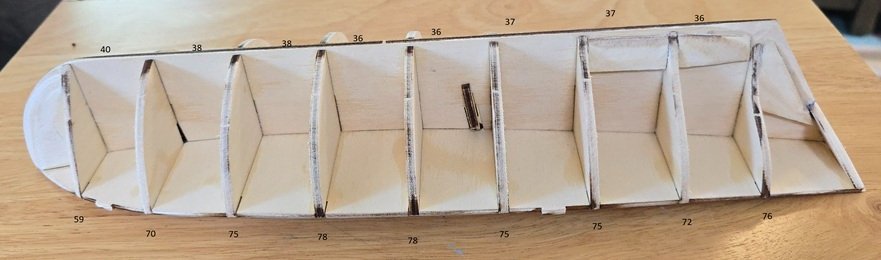
Wondering if someone could help me here. I am confused on entering the info in this awesome calculator. In which columns would i ender the values on this pic? Bottom numbers are rib heights and top numbers are rib spacing. Thanks in advance.
Hi Kedennis,
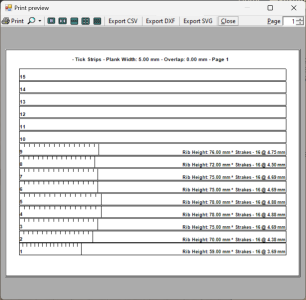
Provided you've used a cloth ruler to measure the heights and spaces as the plank would lay on the ribs and given a plank width of 5mm, you would enter it like this and click calculate.

That's going to give you tick strip and plank layout sheets.
With the hull you have there it might benefit from two different lanes of planks (i.e. divide the hull into two evenly faired lanes and generate tick strips and plank templates for each) but none-the-less it should work either way.
Also, it may be beneficial to measure and add the height and space at the bow and stern using a straight edge laid across the keel and/or lay the garboard and the first plank then measure again, this usually helps to even out any "ripples" or "dips".
Thanks,
Mint
Provided you've used a cloth ruler to measure the heights and spaces as the plank would lay on the ribs and given a plank width of 5mm, you would enter it like this and click calculate.
That's going to give you tick strip and plank layout sheets.
With the hull you have there it might benefit from two different lanes of planks (i.e. divide the hull into two evenly faired lanes and generate tick strips and plank templates for each) but none-the-less it should work either way.
Also, it may be beneficial to measure and add the height and space at the bow and stern using a straight edge laid across the keel and/or lay the garboard and the first plank then measure again, this usually helps to even out any "ripples" or "dips".
Thanks,
Mint
Last edited:
I used this program for the first time this week and it is great. Not sure how often MintGum looks at this, but I am curious why only 20 cutting templates? Mine just happens to have 22 and it does the tick strips with all 22 lines, but the templates only go to 20. Just curious. I might send this as a message if I can.
Hi MovieHQ,
Thanks for the compliment! It's great to know that you've benefited from the program and your feedback is greatly appreciated.
During development, 20 seemed like a reasonable balance for the number of planks per lane and not wasting paper printing unneeded templates. Of course there will be hulls, like yours, that are on the edge, a little over 20 planks for a single lane, where an extra template page will need to be printed. Then there are larger hulls with several lanes of 10-15+ planks each and smaller hulls with less than 20 planks in a single lane.
To print more templates simply calculate and print more copies of one of the template pages.
Thanks,
Mint
Thanks for the compliment! It's great to know that you've benefited from the program and your feedback is greatly appreciated.
During development, 20 seemed like a reasonable balance for the number of planks per lane and not wasting paper printing unneeded templates. Of course there will be hulls, like yours, that are on the edge, a little over 20 planks for a single lane, where an extra template page will need to be printed. Then there are larger hulls with several lanes of 10-15+ planks each and smaller hulls with less than 20 planks in a single lane.
To print more templates simply calculate and print more copies of one of the template pages.
Thanks,
Mint


Well, crap. Tried to open the Hull Planking Calculator tonight, but my Windows 11 Pro, Version 25H2, Smart App Control feature is blocking the opening of the program. From what I am reading, it sounds like in older Windows versions, you could not turn the Smart App Control off, then turn it back on without having to reinstall Windows. But recent updates (supposedly) have eliminated the need for a clean reinstall? I know very little computing skills to understand what might be needed. Has anyone recently run into this when opening the Hull Planking Calculator? Any good solutions? Appreciate the educated advice!
Hi GGibson,
Turning the Smart App Control off (and back on or to evaluation mode) without a reinstall is an option in the version of Windows you are running. Though there are some caveats with later security updates that may permanently gray the option out and require a registry edit to fix.
I choose to leave the Smart App Control off as it suites my workflow better.
The solution Microsoft endorses is to sign the code with a "Code Signing" security certificate. Those certificates have a yearly recurring monetary cost.
Thanks,
Mint
Turning the Smart App Control off (and back on or to evaluation mode) without a reinstall is an option in the version of Windows you are running. Though there are some caveats with later security updates that may permanently gray the option out and require a registry edit to fix.
I choose to leave the Smart App Control off as it suites my workflow better.
The solution Microsoft endorses is to sign the code with a "Code Signing" security certificate. Those certificates have a yearly recurring monetary cost.
Thanks,
Mint