
• Win a Free Custom Engraved Brass Coin!!!
    As a way to introduce our brass coins to the community, we will raffle off a free coin during the month of August. Follow link ABOVE for instructions for entering.
  • SUBSCRIBE TO SHIPS IN SCALE TODAY!

    The beloved Ships in Scale Magazine is back and charting a new course for 2026!
    Discover new skills, new techniques, and new inspirations in every issue.

    NOTE THAT OUR NEXT ISSUE WILL BE MARCH/APRIL 2026

Lettering

Joined
Feb 14, 2021
Messages
100
Points
88

Location
Windsor, ON
As I gain experience in this wonderful hobby I am always looking for ways to not only improve, but also make things easier on myself.

For those reading this post that aren't familiar with the types of ships I build (and yes I will post completed build pics soon - I promise!), I build from scratch the large ships that ply the Great Lakes - big 740ft (for the most part) steel hull "lakers".

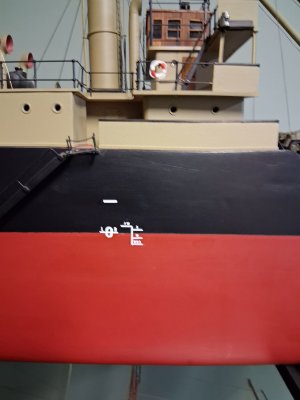
Every ship has a name right?.... so historically I have been using the dry rub lettering from Woodland Scenics. Generally this works good, as the fonts are mostly the same, just different sizes and colours (mostly white on a dark hull, or black on a lightly coloured hull). At scales of 1/192 or so (some are 1/200) the lettering can get quite small at only a couple millimeters in height. I show the ship's name, and at the stern they have the name and port of registry (in a smaller font) and the IMO number. The problem with dry rub lettering this small is you tend to either miss some of the letter (as they are so close together) and/or you get debris from anything surround it when holding the sheet to the model. Aligning everything straight can be a true test of ones patience and how steady your hand is as well. :)

I have considered possibly getting a basic Cricut machine (my wife would be fine with this too!), but I understand they aren't capable of really small fonts like I need.

Has anyone had success at all using decal paper (water slide) for fine detail work like this?

It could just be me overthinking in my quest for perfection.
 
I have used both systems for my models. I prefer the rub on type, however I know it is very hard to keep the proper spacing and also each letter in line. That being said the smallest scale I work with is 1/72 to 1/96. For the scale you are using I would recommend printing what you need on the decal paper (water slide) and applying them that way. The only problem I have found with this method is there is always a faint outline of the decal around your letters when finished, especially on a dark hull. Try building smaller ships at larger scale like some of the old lake freighters. ;)
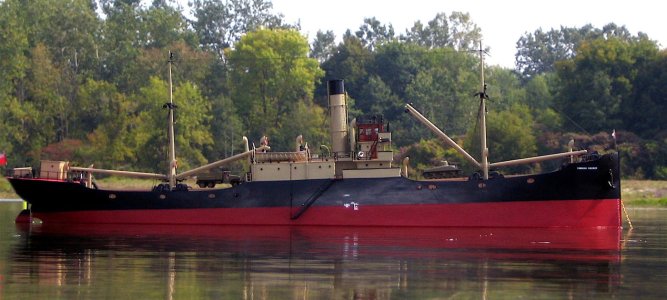
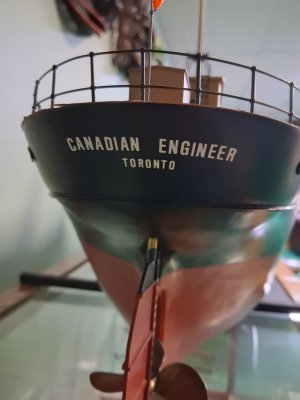
Here is my RC 1/72 1921 Canadian Engineer from the Canadian Government Merchant Marine. Her prototype was around 300 feet. Hope this helps.
Jim

1744319510055.jpeg
 
UPDATE: I did use the waterslide decal paper for the last build I complete, which is posted in the completed gallery on here. They worked wonderfully. Standard inkjet printer, let it dry for about 24 hours, then clear coated it, let it dry 24 hours, one more clear coat again...dry for 24 hours. I would say the process works the same as the decals you get in a kit, aside from being maybe thinner. I did find they were easier to deform while applying than your standard ones.

This way the user can source and print out certain logos, or if you need a certain font that isn't available from say Woodland Scenics (dry rub) it is easy to import the font if it isn't in your printing program.

I will continue to use this method going forward. One other advantage, especially when working with smaller text/letters.... you don't have to worry about neighbouring letters/numbers coming off as well.
 
I would recommend printing what you need on the decal paper (water slide) and applying them that way.
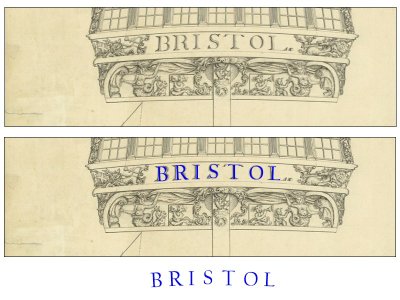
I might have missed this before, but is there any reason the entire word or set of words cannot be made on any simple CAD program then printed onto the decal material? Same goes for freize work. It is easier at times to "draw" the freize on the computer then print onto paper rather than paint with a brush on the model, depending on the artistic skills that we have. Mine surely lacks so alternatives are always nice to find. If the decal material works better than paper has anyone tried this? Thanks

Allan

Example Could the entire word be printed with the requisite curve on the decal material then cut from the sheet and applied to the upper counter.
1758650954091.jpeg
 
I might have missed this before, but is there any reason the entire word or set of words cannot be made on any simple CAD program then printed onto the decal material? Same goes for freize work. It is easier at times to "draw" the freize on the computer then print onto paper rather than paint with a brush on the model, depending on the artistic skills that we have. Mine surely lacks so alternatives are always nice to find. If the decal material works better than paper has anyone tried this? Thanks

Allan

Example Could the entire word be printed with the requisite curve on the decal material then cut from the sheet and applied to the upper counter.
View attachment 546344
I don't see why you couldn't do this. The good thing with decal paper is you can print the text in whatever colour you want too. I know the paper I bought comes with a clear background (what I used) or white background.

In my case I also used Mr. Mark Setter on the surface before applying the decals.
 
Absolutely, this will work in any configuration and colour that you need to fit the contour of your model. The only problem I've had in the past is that my printer won't do white on any type of decal paper.
 
Absolutely, this will work in any configuration and colour that you need to fit the contour of your model. The only problem I've had in the past is that my printer won't do white on any type of decal paper.

Interesting..... I was thinking about that. If you think about it....how often does one print white. Plus the decal paper is on a white background, at least from what I have seen.
 
Here is a company call Circus City Decals. Many in the Model Railroad hobby use them for custom decals.

 
The lightest I can get is a light grey. Do any printer cartridges print in white? Thanks
Allan

That's a good question, and the answer is no. I did a quick search online - to print white you need a specialized type of printer.

I guess you'd have to match the text/images background colour to whatever you would want the decal to go on. For example if you have a black hull on a ship, you could probably create a decal on white background decal paper while have a black "block" around the lettering.
 
Last edited:
I have used that technique of painting black boarder on white decal paper, and it does work if it fits what the model calls for. Otherwise I use the rub on transfer letters which works well but hard to keep them straight on a contoured hull.
 
Back
Top