

-

SUBSCRIBE TO SHIPS IN SCALE TODAY!
The beloved Ships in Scale Magazine is back and charting a new course for 2026!
Discover new skills, new techniques, and new inspirations in every issue.
NOTE THAT OUR NEXT ISSUE WILL BE MARCH/APRIL 2026 -

Win a Free Custom Engraved Brass Coin!!!
As a way to introduce our brass coins to the community, we will raffle off a free coin during the month of August. Follow link ABOVE for instructions for entering.
You are using an out of date browser. It may not display this or other websites correctly.
You should upgrade or use an alternative browser.
You should upgrade or use an alternative browser.
Stropping blocks
- Thread starter zoly99sask
- Start date
- Watchers 7


That’s a great article, it explains the method very well.


Great Article I saw one similar a few years back and I use that Method ever since.

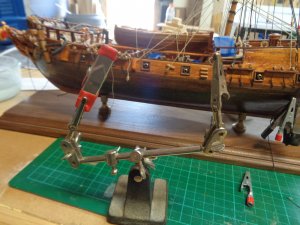
Excellent article, one of things that stands out on this site , besides the skilled builds and friendly members is the great accesses to reference material. Many articles you find are good articles but no “how does it look “pictures. Like many builders I use allot of trial and error to get a certain procedure right. Having a picture of the process gives me that visual to compare with, maybe its just me but it helps. Onther thing on rigging blocks is knowing how read the plans, understanding the terms. For example an early mistake I made was rigging blocks without understanding what a purchase was. As many of us have found out the hard way a purchase is there for a reason, and the block has to be removed and rigged again, which is not always easy. This simple tool is invaluable to me when rigging blocks.

Great article, easy to read and to absorb. I booked market it for my future reference.
Thanks mate
Greg
Thanks mate
Greg

Very good article - thanks for the link my friend 
Did you all checked also the other tutorials?
Take a look at building a ladder, making shakles, hooks etc. - Worth to read
Did you all checked also the other tutorials?
Take a look at building a ladder, making shakles, hooks etc. - Worth to read

How do you "book mark" somethingGreat article, easy to read and to absorb. I booked market it for my future reference.
Thanks mate
Greg
J
G'day JHow do you "book mark" something
J
I'm using Chrome as my browser.
1: On the top right there are 3 Virtual dots.
2: Click that and a pull down menu appears.
3: Then click the star outline on top of the menu. And the bookmarks is saved.
To look at your bookmarks
Do the first 2 steps as above.
3: go down to bookmarks and there you will see all the bookmarks that you have done.
I would assume that other browsers would be similar.
Hope that answers you question.
Greg
Thank you GregG'day J
I'm using Chrome as my browser.
1: On the top right there are 3 Virtual dots.
2: Click that and a pull down menu appears.
3: Then click the star outline on top of the menu. And the bookmarks is saved.
To look at your bookmarks
Do the first 2 steps as above.
3: go down to bookmarks and there you will see all the bookmarks that you have done.
I would assume that other browsers would be similar.
Hope that answers you question.
Greg


Stropping Aid
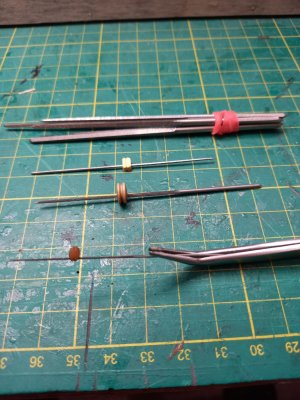
Some time ago I bought a set of small broaches for reaming out holes in rigging blocks.
I have since found an additional use: they are good for holding blocks or deadeyes while applying strops. Being square and serrated they prevent the item rotating - as they used to do when I held them on drill bits.
Some time ago I bought a set of small broaches for reaming out holes in rigging blocks.
I have since found an additional use: they are good for holding blocks or deadeyes while applying strops. Being square and serrated they prevent the item rotating - as they used to do when I held them on drill bits.


Very nice idea. Thanks for posting.Stropping Aid
Some time ago I bought a set of small broaches for reaming out holes in rigging blocks.
I have since found an additional use: they are good for holding blocks or deadeyes while applying strops. Being square and serrated they prevent the item rotating - as they used to do when I held them on drill bits.
View attachment 605309