

• Ships of Scale has incorportated an extra level of security when you log In. Please follow on-screen prompts to acknowledge that you are not a robot via a "Check Box" or a "Pictorial Check Box Puzzle". This is needed due to higher level of AI Activity Security.
  • SUBSCRIBE TO SHIPS IN SCALE TODAY!

    The beloved Ships in Scale Magazine is back and charting a new course for 2026!
    Discover new skills, new techniques, and new inspirations in every issue.

    NOTE THAT OUR NEXT ISSUE WILL BE July/August 2026
  • Win a Free Custom Engraved Brass Coin!!!
    As a way to introduce our brass coins to the community, we will raffle off a free coin during the month of August. Follow link ABOVE for instructions for entering.

FAIR AMERICAN 14 GUN Privateer by Model Shipways 1:48 SCALE

Rob,
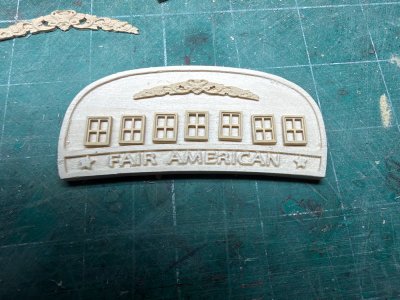
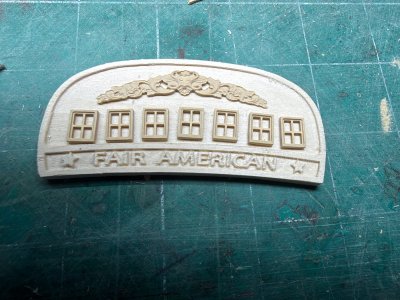
I love what you’re doing there, and would that I had the CNC capability you’ve got. Especially for the name board—looks so much better than the fingernail decal letters I ended up using.

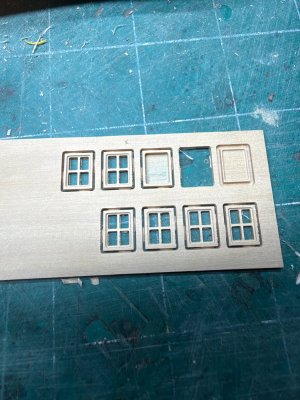
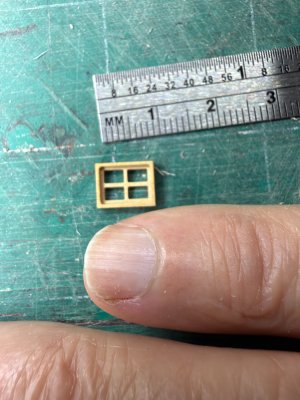
The windows you’ve cut look fantastic, but if you check the plans you’ll notice that the window frames are not all rectangular and become more trapezoidal the farther they are from centerline.

I point this out only because, with your CNC capability, it should be easy enough to make that adjustment, although they’re going to look great either way. I had a bit of a challenge morphing the kit-supplied white metal frames to the right shape and then building framing to accommodate, but I think the end result was worth it.
 
Hey Namabiiru. I'm not that good at the CNC software to make the trapezoids. I just barely get by. I buy .STL files (they are cheap) and modify them. I tried making trapezoids, but just couldn't get them right, so I made rectangles. That'll work for me. I use a software called Vectric Vcarve Desktop, if anyone can help!!

 
TheGatzby. I tried Fusion360 (free version) for some time. Way too complicated for a beginner (for me anyway). And much, much more than I need for the simple things I do. I've found Vcarve desktop so much simpler to use and it's still a powerful CAD/CAM software.

Namabiiru had mentioned trapezoides. Vcarve can to this. The problem I had was.... You can take a rectangle, select it so there are tabs in all four corners. You can select the top left corner and drag it left to angle the left side without shifting the top, bottom or right side. It also angled the windows inside the rectangle. This works fine. What I couldn't get to work was... Every vertical line shifts left with the left side, EXCEPT the vertical right side of the rectangle. What the internet says is to hold the shift key while dragging the top left corner and the right side moves with it. I couldn't get the right side to move off vertical. After trying so many things I finally gave up and made rectanges. Guess I should write Vectric and ask about this... Maybe later. I don't have a problem using rectangles standing vertically as they move down the slope of the transom. Or maybe setting the bottoms parallel with the slope.

Drawing things, setting the dimensions, changing the dimensions/height of a object are all straightforward and easy to learn. Same with setting the object where you want it inside the wood material. It's easy once you learn a couple tricks. Chosing bits and generation of the pathways/gcode are also fairly easy. I watched several youtube vidoes on different softwares before purchasing CNC CAM software to replace the difficult/powerful free version of Fusion360. Vcarve is Windows only, so doesn't run natively on my Apple laptop. But I already had 'Parallels' which allows me to run Windows software on my Apple.
 
Hey Namabiiru. I'm not that good at the CNC software to make the trapezoids. I just barely get by. I buy .STL files (they are cheap) and modify them. I tried making trapezoids, but just couldn't get them right, so I made rectangles. That'll work for me. I use a software called Vectric Vcarve Desktop, if anyone can help!!

They still look great!
 
Back
Top