
• Ships of Scale has incorportated an extra level of security when you log In. Please follow on-screen prompts to acknowledge that you are not a robot via a "Check Box" or a "Pictorial Check Box Puzzle". This is needed due to higher level of AI Activity Security.
  • SUBSCRIBE TO SHIPS IN SCALE TODAY!

    The beloved Ships in Scale Magazine is back and charting a new course for 2026!
    Discover new skills, new techniques, and new inspirations in every issue.

    NOTE THAT OUR NEXT ISSUE WILL BE July/August 2026
  • Win a Free Custom Engraved Brass Coin!!!
    As a way to introduce our brass coins to the community, we will raffle off a free coin during the month of August. Follow link ABOVE for instructions for entering.

Fusion with Claude MCP to create difficult shapes

Joined
Jul 18, 2024
Messages
534
Points
353

Caveat: I have a paid subscription on Claude and Fusion, so I am not sure if this works on free tiers. But it should, as the hard work is done locally. And I am pretty sure there will be similar connectors between e.g. FreeCad.

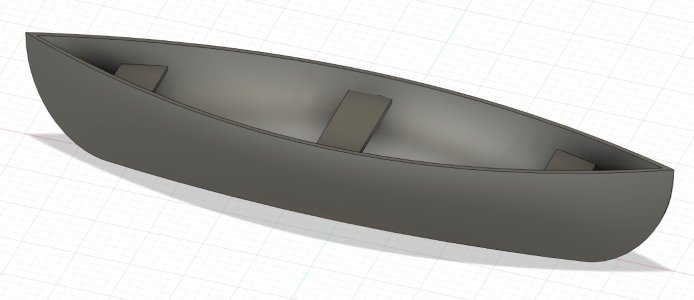
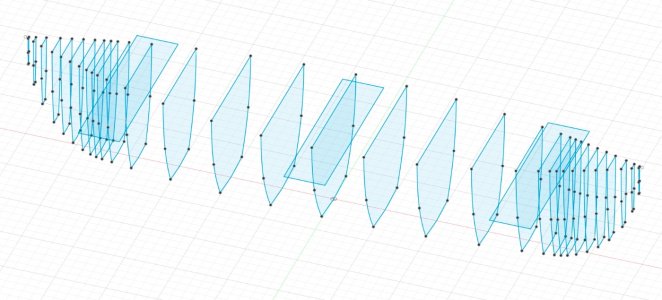
I installed the connector between Claude and Autodesk ai to see if that would help with creating difficult shapes. And it does. I simply described a canoe with some specs (LxWxH plus where the put the width and that I wanted a slight curve off Xmm. No fancy stuff and certainly not a realistic canoe, but good enough to see if this works. Two iterations and 15 minutes work and I had what I expected. To note: I will see what happens when I inject real cross sections, stations and whatnot to create e.g. a destroyer hull. But for a first test and after 15 minutes, I am surprised.

The design is fully configurable, just like I had had created it myself.
Screenshot 2026-10-28 at 17.38.30.JPG

Screenshot 2026-10-28 at 17.38.42.JPG
 
Impressive work!
Biggest challenge is describing what you want. This was a free shape test and even that required a few iterations. Not because the system couldn’t create it, but because my prompt was vague.

I think that the best trick is to first describe the general plan, e.g. “We are going to design a Canadian canoe that can hold three people. Scale is 1/:20. Goal is to end with a 3D printable design with machine XYZ with specs ABC’.
 
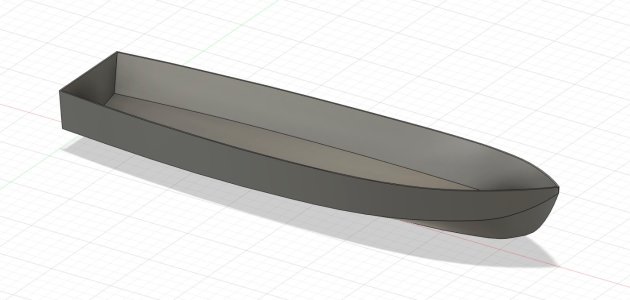
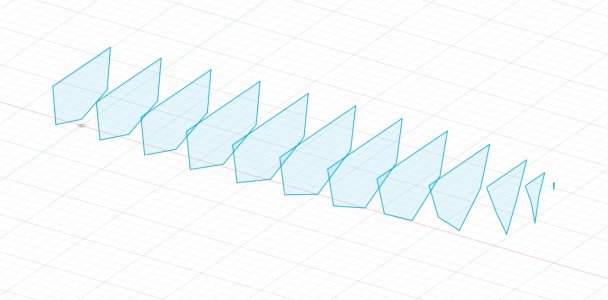
OK, I did another test, now with a plan as we normally use. It took three iterations to get it right, mostly around the bow. And it is still not 100% to my liking, but with what Claude did in Fusion, I can now bend and loft with the existing lines, instead of having to create each one by hand.
This is still a pretty simple hull. A more complex one will need some thinking about how to cut it to two or three parts. For instance when designing a Spanish Galeon, I would create the bottom part of the hull and then the castles. If you try that in one go, things will go pear shaped. And in this test I would have used less ribs, as the rule is to use as little as possible. But overall a pretty interesting tool. It takes away a lot of pain and frustration regarding the standing ribs connecting to the horizontal guide lines.

For the nerds: this was the prompt I started with, which resulted in a 95% correct hull. It is as simple as that. The iterations were simple prompts: 'delete section XYZ and reloft' and such commands.

Prompt:
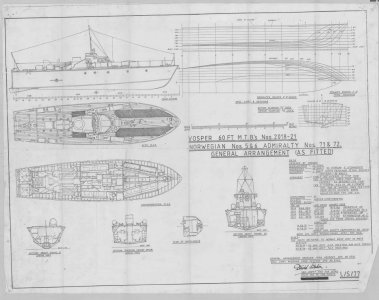
Use the Fusion connector to create a boat hull of a Vosper Motor Torpedo Boat.
Attached find the line plan for this boat. I only want the hull. Do not design or create anything else.
The Fusion design must be 1000mm long. Derive all other measurements from the drawing. Use 3mm for hull thickness.


Screenshot 2026-10-28 at 19.53.18.JPG

Screenshot 2026-10-28 at 20.24.51.JPG

Screenshot 2026-10-28 at 20.25.53.JPG
 
This is really amazing work. I just paid my annual subscription for my SolidWorks license and I really wonder what I am getting. During the past year, I had four difficulties and was able to resolve them with AI in minutes, while the VAR took a few days just to acknowledge my request.

So, during the past year, I have been using AI more and more to solve my SolidWorks issues and my designs are getting better, and I am drawing them faster and faster.

However, I have not yet tried to create a hull like you have done, using an AI tool. This is really great stuff. I will see if this will work with SolidWorks itself.
 
The most impressive and useful thing here, from my perspective, is how fair the lines are. I’m not at all familiar with these connectors but will certainly be having a look tomorrow, as I’ll need to fair my Soleil Royal quite shortly.
 
The lines are everything. SolidWorks is terrible at getting faired lines and I have to use a dedicated program to make the hull shapes. This means I end up with a "blob", as it were, when I insert it in SolidWorks to create the internal parts. I don't want to take over your thread so I won't insert a photo here but I am finishing up a little model for a client, and it uses this combination of one software program for the hulls, and another for the internals.

It sure would be fun if I can use your method to do everything within SolidWorks.
 
I can confirm that the functionality is present in the free version of F360, under Autodesk assistant. I had it create a hull for HMS Victory just from a text instruction. I won't post the result because it's nothing like the real thing, but that doesn't matter as I just wanted to check if the facility was present. When it comes to using it for real, I'd be using station profiles, which should (in theory) mean I get a much better outcome. Fairing a hull in F360 is really hard work so, to that end, I put this query into google "how would I use autodesk assistant to fair a hull shape from a lines plan". The response is quite detailed, too long for here, but well worth perusing if you do the same. below is an excerpt of what looks like the key bit. I'd guess that the better your instruction, the better your result, so if anyone comes up with better questions/instructions, I'd love to see them.


Excerpt from Google AI
Step 2: Use the "Formula Prompt" Strategy
When prompting the Autodesk Assistant for modeling tasks, always structure your prompt using the three-part rule: Goal + Target + Constraints. Use a safety pattern by asking the Assistant to explain its plan before it generates geometry, allowing you to review its parameters. [1]

Phase A: Organizing the Wireframe Layout
To fair a hull, you must project your flat 2D lines plan drawings into 3D space. You can use the Assistant to handle the tedious manipulation of shifting station curves longitudinally down the hull length. [1, 2, 3]
    • Prompt Example:
      "I want to translate a series of 2D profile station curves from the origin along the X-axis (Goal). Target the selected station sketches (Target). Space them incrementally by exactly 500mm starting from Station 0 without scaling or deforming the original geometry (Constraints). Explain your intended command sequence first."
      [1, 2]

Phase B: Curvature Analysis and Point Fairing
Fairing means making curves visually "smooth" by eradicating localized bumps and flat spots. The Assistant can help you generate checking metrics. [1]
    • Prompt Example:
      "Turn on the curvature combs for the selected waterlines and sheer line curves so I can analyze the fairness. Set the comb density to high."

Phase C: Generating the Lofted Skin
Once your stations, waterlines, and buttocks are positioned in 3D space and visually faired, you need to stretch a continuous digital surface over them. [1, 2]
    • Prompt Example:
      "Create a smooth lofted surface across the arranged station sketches (Goal). Target the selected cross-sections in chronological order from bow to stern (Target). Use the sheer line and keel line as guides/rails, and ensure the surface edges maintain G2 curvature continuity (Constraints)."
 
Hi Kevin,

So, this is the traditional way one would use Fusion, SolidWorks, or any of a number of parametric CAD programs. I have been using this method since 2012, and have drawn dozens of boats this way. This method is not good enough. It is tedious, slow, prone to errors, and makes the designer make a lot of decisions.

If you read through the literature, "do the research" as it were, you will find that most ship designers today use a combination of software solutions to come up with a complete design. Delft Ship is probably the most commonly-used design software for hull shapes. Rhino is also good; Vacanti is a dedicated solution; even SketchUp can give you good result.

So, I was hoping the AI would create some sort of structure among all the lines, and allow you to push and pull the whole thing in one shot, creating a complete, deformable, part, instead of asking you to push and pull each individual line.

Do you think the AI would give you a different path if you asked it to use multiple software solutions?
 
Do you think the AI would give you a different path if you asked it to use multiple software solutions?
Hi, I don't know, but in any case I'm not too sure I'd want to do that. The reason being that it is simply horrible working with imported meshes in F360. Everything thereafter becomes a torture test, to the point where (in my view anyway) it is better to reverse engineer the object into native sketches and extrusions, then get rid of the imported mesh. I know I probably ought to instead put the hours into learning something like Rhino3D and change horses altogether, but I figure I won't ever do enough hulls for the time investment to be worth it, and I find F360 pretty easy for almost everything else apart from sculpting.

That said, if I was able to create great lines plans from the Delft hull, in the same way as I can in F360, that I could then bring into F360 as canvases or something, then yes, multi-platform could be a good pathway, especially if the AI would do the heavy lifting around importing and converting. But I think it's worth my while to first see what autodesk assistant makes of transcribed plans, see if it can apply some algorithmic & formulaic approach that maybe modifies imperfect station sketches to take out those small lumps and bumps etc, because at the end of the day, it is all a bunch of mathematical relationships but ones that are a bit beyond my skills. I'm probably hoping for too much but it'll probably be a fun thing to try for a day or two.
 
Interesting. Working with an imported shape in SolidWorks is a snap. All I need is half a surface (one side of the boat, with a zero-thickness surface), and then I do the rest in SW.
 
When you import a shape into F360 you do so as a mesh and, in the round, you have to convert it to a solid to work on it. To be fair, a simple hull is not too bad and you can use tools to recreate a pretty good native facsimile and then drop the mesh. But once the shapes start becoming complex, you end up using a faceted solid which I find hard going, so I try to avoid this.
 
Back
Top