

• Win a Free Custom Engraved Brass Coin!!!
    As a way to introduce our brass coins to the community, we will raffle off a free coin during the month of August. Follow link ABOVE for instructions for entering.
  • PRE-ORDER SHIPS IN SCALE TODAY!

    The beloved Ships in Scale Magazine is back and charting a new course for 2026!
    Discover new skills, new techniques, and new inspirations in every issue.

    NOTE THAT OUR FIRST ISSUE WILL BE JAN/FEB 2026

Proxxon MF 70 | Upgrade Tools Jigs Workspace | Making: grating ladder stair skylight pin carriage pump windlass winch mast yard

And first of all, I'll show you step-by-step instructions on how to install bearings on the Z axis,
which is the first and most important improvement to this machine!
Two quick questions:

1. It's probably obvious when you take it apart, but is that nut flush to the washer/bearing? If so, does tweaking the tightness of the nut take some of the slop out of the z-axis as do the shims with set screws on the x- and y?

2. Is there no modification to the plastic plates as in Jim's posts on the x- and y-axis? That's the scariest part for me.

Thanks for posting this @serikoff. It's very helpful. I've been frustrated with the MF70 since I got it given it's sometimes toy-like feel. These $8 bearings might save me a costly upgrade that I didn't want to make until I had more of the basics of milling. I was able to take some of the slop out of the x- y-axes just playing with the gibs, but there's been nothing for the z-axis.

And thanks to @Jimsky also for his great post on the x- and y-axes. I am getting bearings and sewing machine oil today via Amazon. I'm always up for a major side track project in the shop. I'm looking forward to maxing out this affordable mill.
 
And first of all, I'll show you step-by-step instructions on how to install bearings on the Z axis,
which is the first and most important improvement to this machine!

These bearings can be ordered on AliExpress using this link.
It's important to find the exact size.

View attachment 565583

View attachment 565574

View attachment 565575

Be careful not to move the cylinder with the scale; there's a locking device there that could pop off and get lost! This will need to be done at the end.

View attachment 565576

View attachment 565577

View attachment 565578

View attachment 565579

There's a black cylinder with fractional mm markings under the rotary knob. This cylinder needs to be moved away from the knob. But this needs to be done last, otherwise the pin that holds the cylinder to the axle might come loose. I wrote about this after the picture with the "Attention".

View attachment 565580

View attachment 565581

View attachment 565582

To avoid any friction at all, you can slightly raise the scale cylinder (but this is not necessary; if the scale is very dirty, you can cover the bearings from dust).


To install bearings on the other two axes on the coordinate table, to avoid repetition, here is a thread with detailed instructions:

That's great! I only started using my MF70 recently and immediately found the z axis was very poorly engineered. I will be making the mods that you have suggested on all three axes. Thanks.
 
Two quick questions:

1. It's probably obvious when you take it apart, but is that nut flush to the washer/bearing? If so, does tweaking the tightness of the nut take some of the slop out of the z-axis as do the shims with set screws on the x- and y?

2. Is there no modification to the plastic plates as in Jim's posts on the x- and y-axis? That's the scariest part for me.

Thanks for posting this @serikoff. It's very helpful. I've been frustrated with the MF70 since I got it given it's sometimes toy-like feel. These $8 bearings might save me a costly upgrade that I didn't want to make until I had more of the basics of milling. I was able to take some of the slop out of the x- y-axes just playing with the gibs, but there's been nothing for the z-axis.

And thanks to @Jimsky also for his great post on the x- and y-axes. I am getting bearings and sewing machine oil today via Amazon. I'm always up for a major side track project in the shop. I'm looking forward to maxing out this affordable mill.
It's hard for me to comment on the other axes. I only installed bearings on the Z axis, and the results are very noticeable. I haven't planned the orientation yet; I've been working on the machine and haven't noticed any play or problems with them yet.

Thanks for the feedback. By the way, I've been very pleased with the machine since the first day. But I hope the bearings will help you in all the situations where the Z axis definitely will.

That's great! I only started using my MF70 recently and immediately found the z axis was very poorly engineered. I will be making the mods that you have suggested on all three axes. Thanks.
I was glad to help.
 
My experience is the exact opposite. The X- and Y- axis plate was smooth as butter right out of the box while the Z-axis was very difficult to turn. Once I installed the Z-axis bearing I saw no need for the others. I guess each machine has their own idiosyncrasies.
Merry Christmas and Happy New Year!
... where did you see we had the opposite experience, Oliver: The Z-axis, especially when there was significant play, was very hard to turn, and installing thrust bearings made it turn effortlessly.

Merry Xmas and Happy New Year!
 
In three parts, follow this link to learn how I create this grating and frame for the Proxxon MF 70.

These are two options for two hulls that I'm building simultaneously (one just a frame and the other with a grating).


Alert 1737.jpg


Alert 1733.jpg
 
Last edited:
At this link, I show a detailed step-by-step 3D visualization of the gratings, ladders, and skylights using the Alert 1777 cutter, as an example.

But the idea is applicable to absolutely all similar structures.


Cutter HMS Alert 1777 25.jpg
Cutter HMS Alert 1777 44.jpg

Cutter HMS Alert 1777 56.jpg
Cutter HMS Alert 1777 14.jpg
 
Hello
I have a kit that I purchased for converting the proxxon device into a CNC machine. I have had that kit for years and still have not installed it because I wasn`t sure what to do with the backlash. I was wondering if these modifications help with this backlash problem? Also is the backlash measurable and constant?
 
Hello
I have a kit that I purchased for converting the proxxon device into a CNC machine. I have had that kit for years and still have not installed it because I wasn`t sure what to do with the backlash. I was wondering if these modifications help with this backlash problem? Also is the backlash measurable and constant?
It's hard to say. I think the play varies between machines, and it depends on how tight the axle nut is. Honestly, I didn't notice any play on the X and Y axes, and after installing the bearings on the Z axe, I didn't notice any either. In any case, I didn't notice any misalignments while making the grating. Maybe I got a good machine. ;)
 
It's hard to say. I think the play varies between machines, and it depends on how tight the axle nut is. Honestly, I didn't notice any play on the X and Y axes, and after installing the bearings on the Z axe, I didn't notice any either. In any case, I didn't notice any misalignments while making the grating. Maybe I got a good machine.
I notice a little bit of inaccuracy when i use the mill. I am thinking of adding thrust bearings to all the axes. Since it is so cheap to do, I might as well go ahead and do it.
 
Yes. I have the same lingering problem on the Z axis - especially when raising the cutter. Surely a design flaw. I assume better mills don't have this problem which is why I am always peaking in store windows wondering if it is time for an upgrade.
and therein lies the dilemma. Yes there are better machines out there but they are big. For me personally, I am stuck to the MF70 because of that. Plus, once I have this backlash thing sorted out, I can convert it to a CNC machine.
 
I'm continuing to share my experience making gratings and frames for them.

Follow the link below - in three parts, I show step-by-step how to make a Proxxon MF70 Main Hatchway with anchor rope holes.


Alert 1785.jpg


Alert 1743.jpg


Alert 1766.jpg


Alert 1768.jpg
 
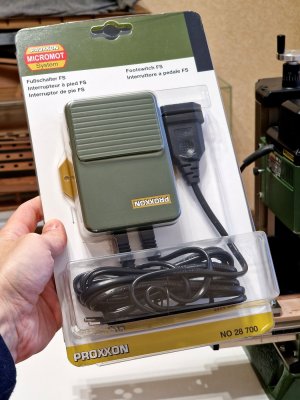
Another very useful feature that (in my opinion) is a must-have for your router.

The pedal.

20260112_131208.jpg

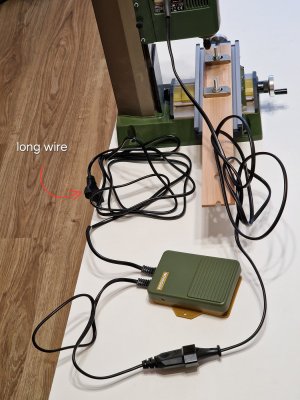
One of the big advantages is that you can quickly turn the router on or off at any time without using your hands (the latter is much more important).

The second advantage is the long cord. The pedal cord is longer than the cord from the router, and it starts further from the router itself, so the cord can reach further to the outlet.

20260112_131919.jpg

I definitely recommend it.
 
Another very useful feature that (in my opinion) is a must-have for your router.

The pedal.

View attachment 569942

One of the big advantages is that you can quickly turn the router on or off at any time without using your hands (the latter is much more important).

The second advantage is the long cord. The pedal cord is longer than the cord from the router, and it starts further from the router itself, so the cord can reach further to the outlet.

View attachment 569943

I definitely recommend it.
Hi,

my bearings came and I have fitted them to the Z-axis which has really improved the control, very little backlash and really smooth to operate (why Proxxon couldn't do something like that in the first place is ???). I haven't fitted the X/Y bearings yet, they are not too bad compared to the Z-axis. One thing I might do to improve the Z-control is to drill out the plastic and fit a bronze bush so that the bearings are sitting on the metal rather than plastic.

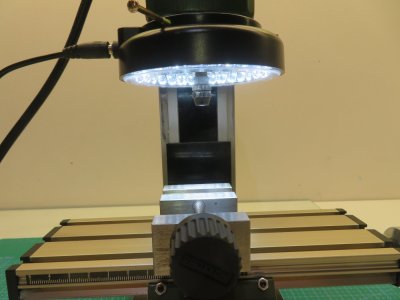
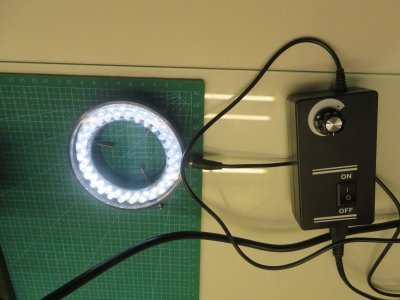
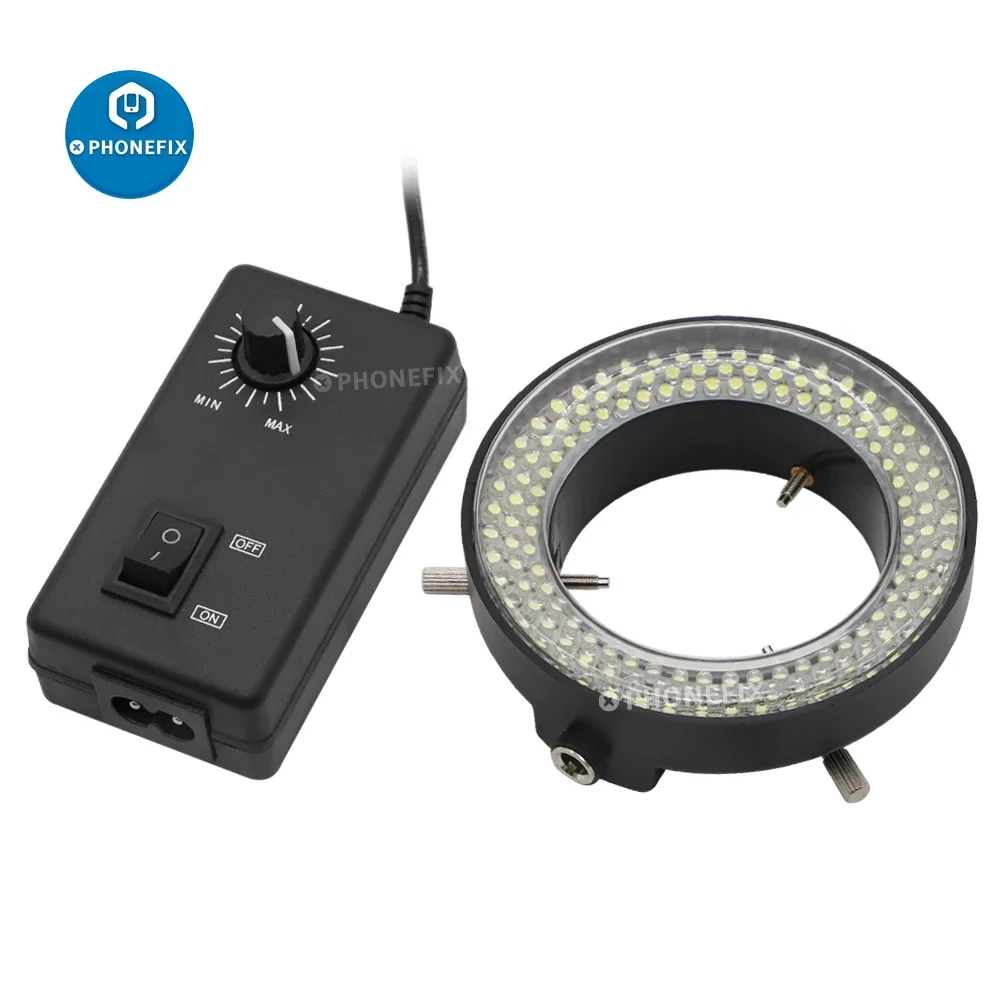
A foot control will be very good when doing repetitive drill/shift/drill/shift. One other add on I have found very useful is a ring light. I am not sure if Proxxon do one that fits the MF70, but I bought a very low cost adjustable ring light for a microscope from ebay that works very well. It is a little on the large size, but if you are not changing the bits often, it is fine once set up but is very easy to take on and off.

IMG_6504.JPGIMG_6505.JPG
 
Hi,

my bearings came and I have fitted them to the Z-axis which has really improved the control, very little backlash and really smooth to operate (why Proxxon couldn't do something like that in the first place is ???). I haven't fitted the X/Y bearings yet, they are not too bad compared to the Z-axis. One thing I might do to improve the Z-control is to drill out the plastic and fit a bronze bush so that the bearings are sitting on the metal rather than plastic.

A foot control will be very good when doing repetitive drill/shift/drill/shift. One other add on I have found very useful is a ring light. I am not sure if Proxxon do one that fits the MF70, but I bought a very low cost adjustable ring light for a microscope from ebay that works very well. It is a little on the large size, but if you are not changing the bits often, it is fine once set up but is very easy to take on and off.

View attachment 570011View attachment 570012
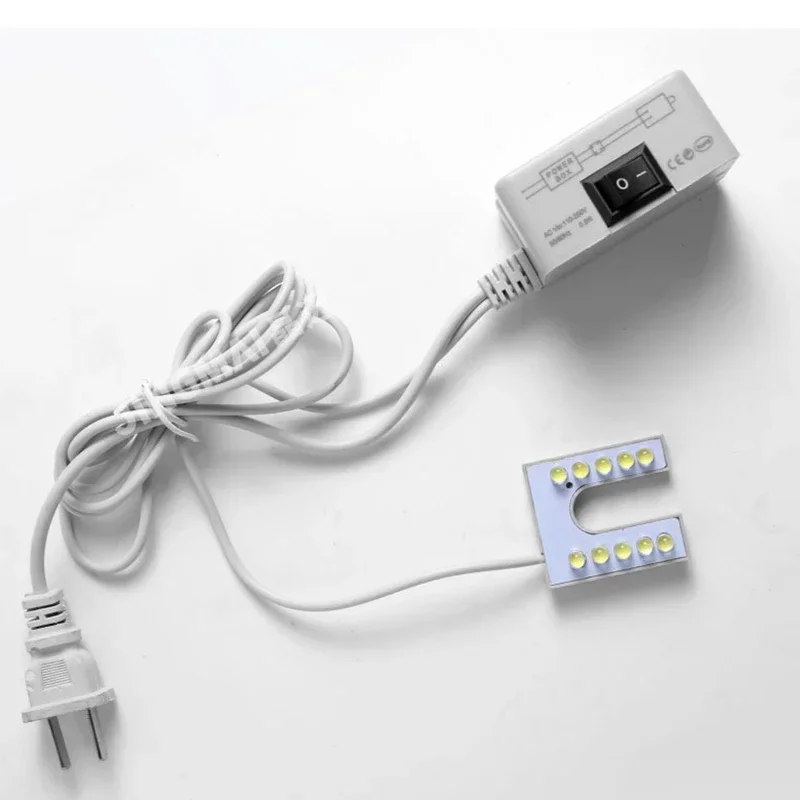
Thanks for sharing. I'm also thinking about installing lights. There are sewing machine lamps on AliExpress. I'll share my impressions once I order and install them.
 
I bought a very low cost adjustable ring light for a microscope from ebay that works very well. It is a little on the large size, but if you are not changing the bits often, it is fine once set up but is very easy to take on and off.
How many LEDs do you have there? There are 3 versions.
 
For curiosity only: what you guys with the proxxon think about the motor? basically, do you wish for more torque rather than speed or it does not really matter? I can see several advantages in favor of the proxxon but I'm a little concerned to miss the torque of the foredom, beside the fact that it is not a milling system (I can only approximate it).
 
For curiosity only: what you guys with the proxxon think about the motor? basically, do you wish for more torque rather than speed or it does not really matter? I can see several advantages in favor of the proxxon but I'm a little concerned to miss the torque of the foredom, beside the fact that it is not a milling system (I can only approximate it).
I bought my MF70 2 years ago and have found it to be really good for making precise small wooden parts like hatchways, steps, gratings, fife rails etc. For that, high speed and small cutters are perfect but you should only be doing fine cuts from stock pieces near to the finished size, so torque is not that critical. If you need to mill large blocks of wood or mill metal, it is not the tool to use and you really need to invest in a larger more powerful desktop milling machine. Personally, the MF70 is good enough for small scale model ship building, anything else is overkill because the machines are a)expensive, b) take up a lot of room and c) are too "big" for machining small parts.
 
How many LEDs do you have there? There are 3 versions.
I have the one shown with 60 leds. They are very bright and I usually have them turned down quite low which is ample to light the pieces I am working on.
In my opinion, this is a bit big for such a small machine. I'm more inclined to this option.


For curiosity only: what you guys with the proxxon think about the motor? basically, do you wish for more torque rather than speed or it does not really matter? I can see several advantages in favor of the proxxon but I'm a little concerned to miss the torque of the foredom, beside the fact that it is not a milling system (I can only approximate it).
I don't know if I translated it correctly. The maximum speed is up to 20,000 rpm, but only thin cutters, up to 3-4 mm, are allowed, so if you need more, you might have problems. Otherwise, the machine is very good for its intended purposes.
 
In my opinion, this is a bit big for such a small machine. I'm more inclined to this option.


I don't know if I translated it correctly. The maximum speed is up to 20,000 rpm, but only thin cutters, up to 3-4 mm, are allowed, so if you need more, you might have problems. Otherwise, the machine is very good for its intended purposes.
The LED ring light is quite large I agree. I looked around but was not able to find a smaller ring light that would fit onto the bottom of the mill body (36mm diameter). I don't know if the sewing light would fit but if it does, it looks a nice cheap option. I tried using some small LED spot lights on flexible stalks to light the work area but I found that the lights just got in the way and cast shadows so you really need to light directly above the cutter. If I find time I might make a custom LED light myself as a little project.
 
Back
Top